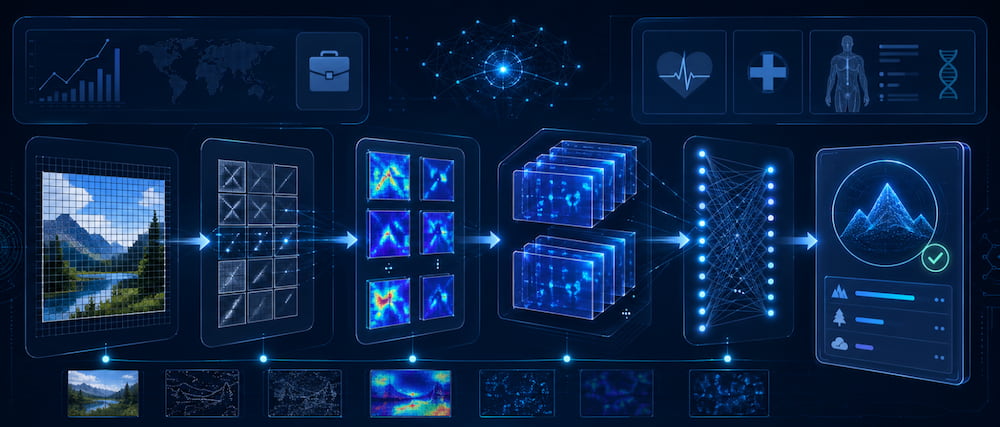
Building an effective CNN model requires understanding how different parts of an AI image-recognition system work together. CNN stands for Convolutional Neural Network, a type of artificial intelligence designed mainly to analyse images. It can detect visual patterns such as edges, shapes, textures, objects, logos, or even signs of disease in medical scans.
The process of building a CNN is called CNN model assembly. This means putting together the right layers, preparing the image data, training the model, testing its accuracy, and finally using it in real-world applications.
CNNs are commonly used in areas such as:
- Medical imaging, such as detecting problems in X-rays or CT scans
- E-commerce, such as classifying product images
- Brand marketing, such as identifying logos in marketing materials
- Website analytics, such as studying screenshots or heatmaps
- Workflow automation, where image analysis is connected to business systems
Core Components of a CNN Model
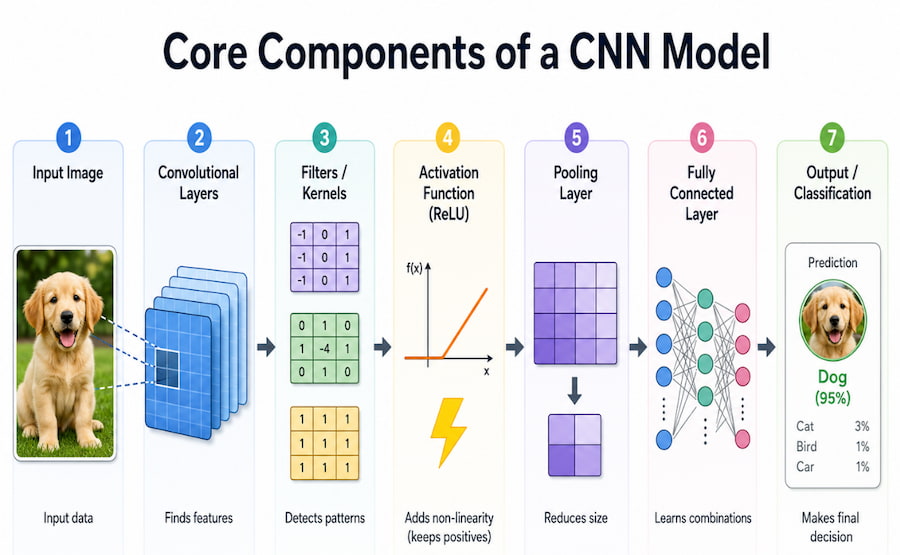
A CNN is built from several important parts. Each part has a specific job in helping the model understand an image.
|
Component |
What It Does |
Simple Explanation |
|
Convolutional Layers |
Extract features from images |
These layers scan the image to find patterns like edges, textures, and shapes. |
|
Filters / Kernels |
Detect specific visual features |
These are small grids of numbers that slide across the image to find certain patterns. |
|
Pooling Layers |
Reduce image size while keeping important information |
These layers make the data smaller so the model can process it faster. |
|
Activation Functions |
Help the model learn complex patterns |
These decide which signals are important enough to pass forward. |
|
Fully Connected Layers |
Make the final decision |
These layers interpret the extracted features and classify the image. |
A CNN works in stages. The early layers usually detect simple features such as lines, edges, and colours. The deeper layers combine those simple features into more complex patterns, such as shapes, objects, faces, logos, or medical abnormalities.
This is called hierarchical feature learning. “Hierarchical” means the model learns step by step, moving from simple details to more advanced meanings.
Why CNNs Are Good at Image Analysis
CNNs are especially powerful for image tasks because of two main features: parameter sharing and translational invariance.
Parameter Sharing
In a normal neural network, the model may need to learn separate patterns for different parts of an image. A CNN is more efficient because it uses the same filter across the whole image.
For example, if a filter learns how to detect a horizontal line, it can detect that line whether it appears at the top, middle, or bottom of the image. This reduces the number of settings the model needs to learn and makes training faster.
Translational Invariance
This means the CNN can recognize an object even if it appears in a different position.
For example, a person can recognise a cat whether it is in the centre of a photo or in the corner. A CNN tries to do the same thing. It learns that the object itself matters more than its exact location in the image.
Together, these features make CNNs very useful for tasks like object recognition, product classification, medical image analysis, and logo detection.
Convolutional Layers and Filters
The most important part of a CNN is the convolutional layer.
A convolutional layer uses small grids called filters or kernels. These filters slide across an image and look for specific patterns. Each filter may learn to detect something different, such as:
- A straight edge
- A curve
- A corner
- A texture
- A colour change
- A shape
When the filter moves across the image, it performs a calculation called a dot product. In simple terms, this means the filter compares its own values with the pixel values in the image. If the image area matches the pattern the filter is looking for, the model gives a stronger response. The result is called a feature map. A feature map shows where certain patterns appear in the image.
How a Filter Works
- The filter starts at the top-left corner of the image.
- It compares its values with the pixel values underneath it.
- It produces one output value.
- It moves across the image step by step.
- The full set of output values becomes a feature map.
Common Filter Settings
|
Setting |
Common Values |
Meaning |
|
Filter Size |
3×3, 5×5, 7×7 |
Larger filters can capture bigger patterns but require more computing power. |
|
Stride |
1 or 2 |
This controls how far the filter moves each step. |
|
Padding |
Same or Valid |
This controls how the model handles the edges of the image. |
Stride means the number of pixels the filter moves at a time. A stride of 1 moves slowly and captures more detail. A stride of 2 moves faster and reduces the image size.
Padding means adding extra pixels around the edge of the image. This helps the filter analyse the edges properly. “Same” padding keeps the output size similar to the input size, while “valid” padding only uses areas where the filter fully fits inside the image.
In medical imaging, such as analysing chest X-rays, preserving edge details can be important, so “same” padding is often useful.
Pooling Layers and Activation Functions
CNNs also use pooling layers and activation functions to improve performance.
Pooling Layers
Pooling layers reduce the size of feature maps while keeping the most important information. This makes the model faster and less likely to overfocus on tiny details.
There are two common types of pooling:
|
Type |
What It Does |
Best Used For |
|
Max Pooling |
Takes the highest value from a small region |
Good for keeping the strongest features. |
|
Average Pooling |
Takes the average value from a small region |
Good for preserving general context. |
For example, a 2×2 max pooling layer looks at a small 2×2 area and keeps only the highest value. This reduces the image size but keeps the strongest signal.
Pooling is useful because it:
- Reduces the amount of computation needed
- Makes the model faster
- Helps the model recognise features even if they move slightly
- Reduces the risk of overfitting
Overfitting means the model memorises the training images instead of learning general patterns. If a model overfits, it may perform well on training data but badly on new images.
Activation Functions
An activation function helps the model decide which signals are important enough to continue through the network.
The most common activation function in CNNs is ReLU, which stands for Rectified Linear Unit.
In simple terms, ReLU does this:
- If the value is positive, keep it.
- If the value is negative, turn it into zero.
This helps the model focus on useful signals and ignore weaker or negative signals. ReLU is popular because it is simple, fast, and works well for deep learning.
A typical CNN block follows this order:
- Convolutional layer extracts features.
- ReLU activation highlights useful signals.
- The pooling layer reduces the size.
- The process repeats through deeper layers.
Step-by-Step CNN Assembly Methodology

Building a CNN usually follows a structured process.
|
Phase |
Main Activities |
Common Tools |
|
Data Preprocessing |
Resize, clean, normalise, augment, and split images |
Python, TensorFlow, PyTorch |
|
Architecture Design |
Choose and arrange model layers |
Keras, PyTorch |
|
Training |
Teach the model using image data |
GPUs, TPUs, Vertex AI |
|
Evaluation |
Test the model’s performance |
Scikit-learn, custom scripts |
|
Deployment |
Use the model in a real application |
APIs, TensorFlow Serving, Vertex AI |
Step 1: Data Preprocessing
Data preprocessing means preparing raw images so the CNN can understand them properly.
Raw images may come in different sizes, lighting conditions, formats, and quality levels. If they are not prepared correctly, the CNN may struggle to learn useful patterns.
The main preprocessing steps are:
|
Step |
Purpose |
Example |
|
Resizing |
Makes all images the same size |
224×224 pixels |
|
Normalisation |
Makes pixel values more consistent |
Scaling colour values |
|
Augmentation |
Creates image variations |
Flips, rotations, zooms |
|
Splitting |
Separates data for training and testing |
80% training, 10% validation, 10% testing |
Resizing
Many popular CNN models, such as ResNet and VGG, use images sized at 224×224 pixels. Resizing makes sure all images have the same dimensions before entering the model.
Normalisation
Images are made of pixels, and each pixel has numerical values. Normalisation adjusts these values into a more stable range so the model can train better.
For pretrained models, ImageNet statistics are often used. ImageNet is a large image dataset that many CNNs are trained on before being adapted to other tasks.
Data Augmentation
Data augmentation means creating new versions of existing images to make the training data more diverse. For example, the same image can be slightly rotated, flipped, zoomed, or adjusted in brightness. This helps the CNN learn better because it sees more variation. In medical imaging, augmentation must be used carefully. For example, an X-ray should not be changed in a way that makes it medically unrealistic.
Train, Validation, and Test Split
The dataset is usually divided into three parts:
- Training set: Used to teach the model.
- Validation set: Used to check performance during training.
- Test set: Used only at the end to see how well the model works on unseen data.
This prevents the model from being judged only on images it has already seen.
Step 2: Architecture Design
Architecture design means deciding how the CNN will be structured.
A basic CNN architecture usually includes:
- Convolutional layers to extract features
- Activation functions to introduce learning ability
- Pooling layers to reduce data size
- Fully connected layers to make the final prediction
- Output layer to classify the image
For example, if the model is trained to classify animals, the output layer may include categories such as cat, dog, bird, and horse. If the model is trained for medical imaging, the output layer may classify images as normal or abnormal.
Step 3: Training with Transfer Learning
Training a CNN from zero can take a lot of time and require huge amounts of data. Because of this, many projects use transfer learning.
Transfer learning means using a model that has already been trained on a large dataset, then adapting it for a new task.
For example, a model trained on ImageNet has already learned basic visual features such as edges, textures, shapes, and objects. These learned features can be reused for other tasks, such as identifying logos or analysing medical scans.
How Transfer Learning Works
- Load a pretrained model, such as ResNet50.
- Keep the early layers because they already know basic visual patterns.
- Replace the final layer with a new one for your specific task.
- Train the new layers using your own dataset.
- Optionally fine-tune some deeper layers for better accuracy.
Frozen Layers
When a layer is “frozen,” it means the model does not update that layer during training. Freezing early layers is useful because those layers already know general image features. This saves time and reduces the risk of overfitting.
Benefits of frozen layers include:
- Faster training
- Less data required
- Better generalisation
- Lower risk of memorising the training data
Step 4: Evaluation and Deployment
After training, the model must be tested.
Common evaluation metrics include:
|
Metric |
Meaning |
|
Accuracy |
How many predictions were correct overall |
|
Precision |
Of the items predicted as positive, how many were actually positive |
|
Recall |
Of the actual positive items, how many the model found |
|
F1-score |
A balanced score combining precision and recall |
|
Sensitivity |
Important in medical use; measures how well the model detects true cases |
|
Specificity |
Measures how well the model avoids false alarms |
|
ROC AUC |
Measures how well the model separates classes |
Once the model performs well, it can be deployed. Deployment means putting the model into a real system, such as a website, mobile app, API, or business workflow. For production use, companies often care about speed. For example, an image classification system may need to respond in under 200 milliseconds.
Optimising CNN Architecture for Better Performance
CNN performance can be improved through several strategies.
|
Strategy |
Purpose |
When to Use |
|
Transfer Learning |
Saves time and reduces data needs |
When pretrained models are available |
|
Regularisation |
Prevents overfitting |
When the dataset is small |
|
Pruning |
Makes the model smaller |
When deploying to mobile or edge devices |
|
Quantisation |
Makes the model faster |
When speed is important |
|
Hardware Acceleration |
Speeds up training and prediction |
When using GPUs or TPUs |
Dropout: Preventing Overfitting
Dropout is a technique used to prevent overfitting.
During training, dropout randomly turns off some neurons. A neuron is a small processing unit in the neural network. By randomly switching some off, the model cannot depend too much on any single neuron.
This forces the model to learn stronger and more general patterns.
For example, a dropout rate of 0.5 means 50% of selected neurons are temporarily turned off during training.
Dropout is commonly used:
- After fully connected layers
- Before the final output layer
- Sometimes in convolutional layers
The main benefit is that the CNN becomes less likely to memorise the training data.
Batch Normalisation and Learning Rate Scheduling
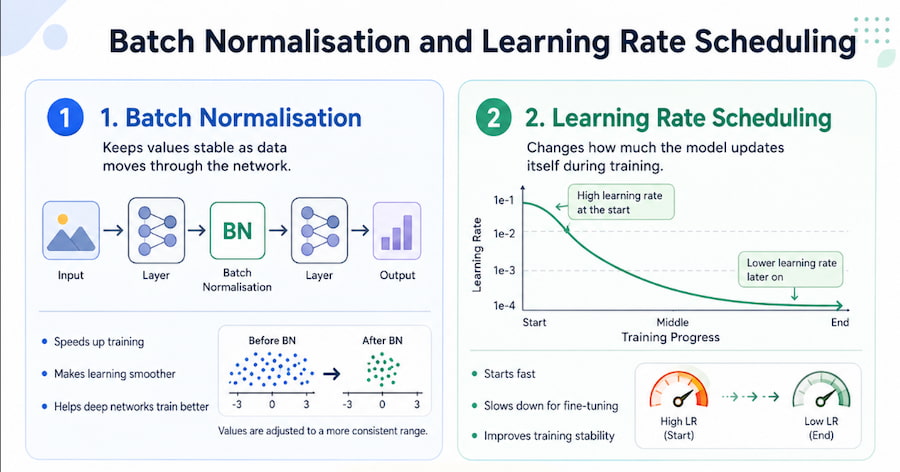
Batch Normalisation
Batch normalisation helps stabilise training.
As data moves through a neural network, the values can shift in a way that makes training unstable. Batch normalisation keeps these values more consistent by adjusting them to a standard range.
This helps the model:
- Train faster
- Learn more steadily
- Handle deeper networks better
- Reduce training problems
Learning Rate Scheduling
The learning rate controls how much the model updates itself during training. If the learning rate is too high, the model may learn too aggressively and become unstable. If it is too low, training may be very slow. Learning rate scheduling changes the learning rate over time. A common method is to start with a higher learning rate and reduce it gradually as training continues. This helps the model learn quickly at first, then fine-tune more carefully later.
Early Stopping and Hardware Acceleration
Early Stopping
Early stopping prevents the model from training for too long.
During training, the model is checked against the validation set. If the validation performance stops improving after several rounds, training stops automatically.
This helps prevent overfitting because the model does not continue learning unnecessary details from the training data.
Hardware Acceleration
Training CNNs can take a long time, especially with large image datasets. Hardware acceleration uses specialised hardware to speed up the process.
|
Hardware |
Speed |
Best For |
|
CPU |
Slowest |
Small models and testing |
|
GPU |
Much faster |
Most deep learning tasks |
|
TPU |
Very fast |
Large-scale AI training |
A GPU is commonly used for deep learning because it can handle many calculations at the same time.
A TPU is Google’s specialised AI chip designed for machine learning tasks.
Hyperparameter Tuning
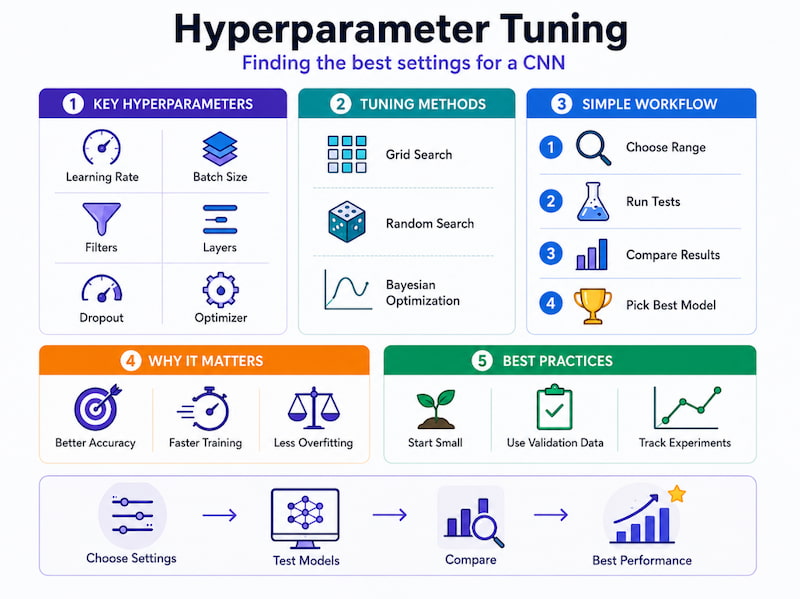
Hyperparameters are settings chosen before training starts. Unlike weights, the model does not learn them automatically.
Important hyperparameters include:
|
Hyperparameter |
Common Values |
Why It Matters |
|
Learning Rate |
0.001, 0.0001, 0.00001 |
Controls how fast the model learns |
|
Batch Size |
16, 32, 64 |
Controls how many images are processed at once |
|
Epochs |
50–100 |
Controls how many times the model sees the full dataset |
An epoch means one full pass through the training dataset.
A batch size of 32 means the model processes 32 images at a time before updating itself.
One common method for finding good hyperparameters is grid search. This means testing different combinations and choosing the one that performs best on the validation set.
Case Study 1: Brand Marketing Image Classification
One real-world example involved using a ResNet50-based CNN to detect brand logos across 50,000 marketing assets.
ResNet50 is a popular CNN architecture. It is known for using “skip connections,” which help deep networks train more effectively.
The system used transfer learning from ImageNet and was trained using Google Cloud Vertex AI.
Results
|
Metric |
Result |
|
Accuracy / Precision |
97.2% |
|
Processing Speed |
15× faster |
|
Manual Review Time |
Reduced from 40 hours per week to 2 hours |
|
ROI |
8× return in 3 months |
This shows how CNNs can automate tasks that would otherwise require many hours of manual review.
The key success factors were:
- Using transfer learning
- Applying data augmentation
- Using ResNet50 for strong image recognition
- Deploying the model through cloud infrastructure
- Integrating the model into a real business workflow
Common Real-World CNN Challenges
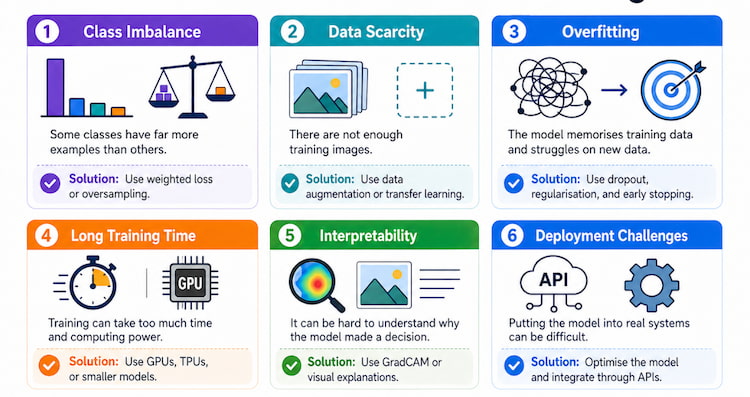
CNNs can perform well, but real-world projects often face several challenges.
|
Challenge |
Meaning |
Solution |
|
Class Imbalance |
Some categories have far more examples than others |
Weighted loss, oversampling |
|
Data Scarcity |
Not enough training examples |
Data augmentation, transfer learning |
|
Overfitting |
Model memorises training data |
Dropout, early stopping, regularisation |
|
Long Training Time |
Training takes too long |
GPUs, TPUs, transfer learning |
|
Interpretability |
Hard to understand why the model made a decision |
GradCAM, visual explanations |
Class Imbalance
Class imbalance happens when one category has many more examples than another.
For example, in a medical dataset, there may be many normal X-rays but very few X-rays showing a rare disease. If the model trains on this data without adjustment, it may become biased toward predicting “normal” most of the time.
A common solution is weighted loss, where the rare class is given more importance during training.
Data Scarcity
Data scarcity means there are not enough examples for the model to learn properly.
This is common in medical imaging, where rare diseases may have limited data. To solve this, developers can use:
- Data augmentation
- Transfer learning
- Synthetic image generation
- Careful regularisation
Synthetic data means artificially created data. One method uses GANs, or Generative Adversarial Networks. GANs are AI systems that create realistic new examples by learning from existing data. However, synthetic data must be checked carefully, especially in medical settings, because unrealistic data can mislead the model.
Model Interpretability
CNNs are often called “black box” models because it can be difficult to understand exactly why they made a decision. This is a major concern in high-stakes areas such as healthcare. One solution is GradCAM, which stands for Gradient-Weighted Class Activation Mapping. GradCAM creates a heatmap showing which parts of the image influenced the model’s prediction. For example, in a chest X-ray system, GradCAM can show whether the CNN focused on the lung area or on an irrelevant part of the image.
This helps:
- Build trust with users
- Support error analysis
- Help experts review model decisions
- Improve safety in critical applications
Integration with Business Workflows
After a CNN is trained, it can be connected to business systems.
A typical workflow may look like this:
- A user uploads an image.
- The image is sent to the CNN through an API.
- The CNN analyses the image.
- The system returns a prediction and confidence score.
- The result is used in a business process.
For example:
- A marketing team can automatically identify brand logos.
- An e-commerce platform can classify product photos.
- A medical system can flag suspicious scans for review.
- A website analytics tool can study user behaviour screenshots.
Common tools for deployment include:
|
Component |
Example |
|
Model Format |
TensorFlow SavedModel |
|
Hosting |
Vertex AI endpoints |
|
API |
REST API |
|
Automation |
Zapier, n8n |
|
Monitoring |
Cloud dashboards |
Case Study 2: CNNs for Website Analytics
Another example involved using CNNs to analyse website screenshots and heatmaps. The model was trained on 100,000 user interaction screenshots. These screenshots helped the CNN identify user experience patterns, such as where users clicked, scrolled, or ignored content. The goal was to improve website design and increase conversions.
Results
|
Metric |
Result |
|
Classification Accuracy |
92% |
|
Conversion Improvement |
23% increase |
|
ROI Payback |
6 months |
This shows that CNNs are not only useful for medical images or product images. They can also help businesses understand digital behaviour and improve website performance.
Scaling CNN Models for High-Volume Use
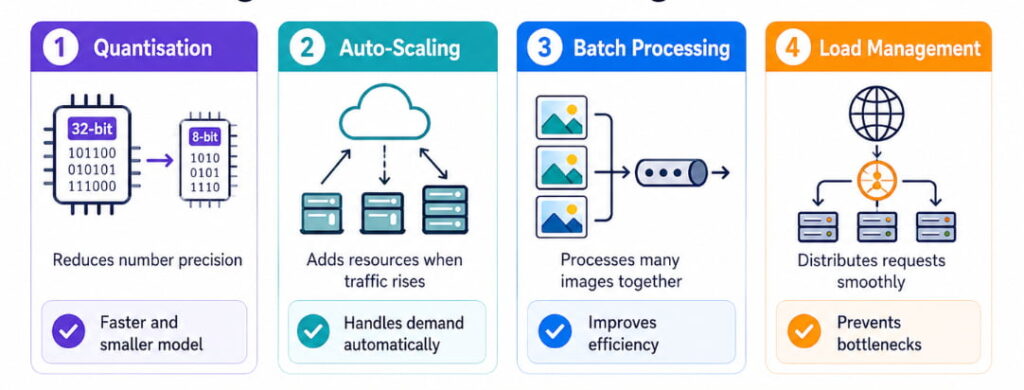
When a CNN needs to handle many requests, it must be optimised for speed and scale.
Common scaling methods include:
|
Method |
Meaning |
Benefit |
|
Quantisation |
Reduces number precision |
Makes the model faster and smaller |
|
Auto-scaling |
Adds more servers when traffic increases |
Handles demand automatically |
|
Batch Processing |
Processes multiple images together |
Improves efficiency |
Quantisation
Quantisation reduces the precision of the model’s numbers. For example, it may convert 32-bit numbers into 8-bit numbers.
This makes the model smaller and faster, but it may slightly reduce accuracy. In many production systems, a small accuracy drop is acceptable if the speed improvement is large.
AI Advisory Best Practices from CNN Case Studies
Several best practices can be learned from real-world CNN deployments.
|
Best Practice |
Why It Matters |
|
Start with Transfer Learning |
Saves time and improves results |
|
Prioritise Data Quality |
Clean, well-labelled data is more useful than messy large datasets |
|
Integrate Early |
Connecting the model to workflows early gives faster feedback |
|
Validate with Experts |
Domain experts can confirm whether the model’s output is useful |
|
Iterate Regularly |
Weekly improvements help the model stay accurate and relevant |
One of the most important lessons is that data quality often matters more than model complexity. A simple model trained on clean, well-labelled data can outperform a complex model trained on messy data.
Transfer Learning for Efficient Training
Transfer learning is one of the most useful techniques in CNN assembly because it saves time and reduces the need for large datasets.
|
Approach |
Data Required |
Training Time |
|
Training from Scratch |
100,000+ images |
Days to weeks |
|
Transfer Learning |
1,000–10,000 images |
Hours to days |
|
Fine-tuning Only |
100–1,000 images |
Minutes to hours |
Transfer learning works because early CNN layers learn general visual features such as edges, colours, and textures. These features are useful across many image tasks. For example, the edge of a car, the outline of a product, and the boundary of an organ in a scan all involve visual features that CNNs can reuse.
A/B Testing for CNN Models
A/B testing compares two versions of a model to see which performs better.
For example:
- 50% of images go to Model A.
- 50% of images go to Model B.
- Their accuracy, speed, and business impact are compared.
- The better model is selected.
A/B testing is useful because it allows teams to improve AI systems without replacing everything at once.
Metrics to monitor include:
|
Metric Type |
Examples |
|
Model Metrics |
Accuracy, precision, recall, F1-score |
|
System Metrics |
Speed, latency, error rate |
|
Business Metrics |
Conversion, engagement, customer satisfaction |
RAG and Agentic Bots
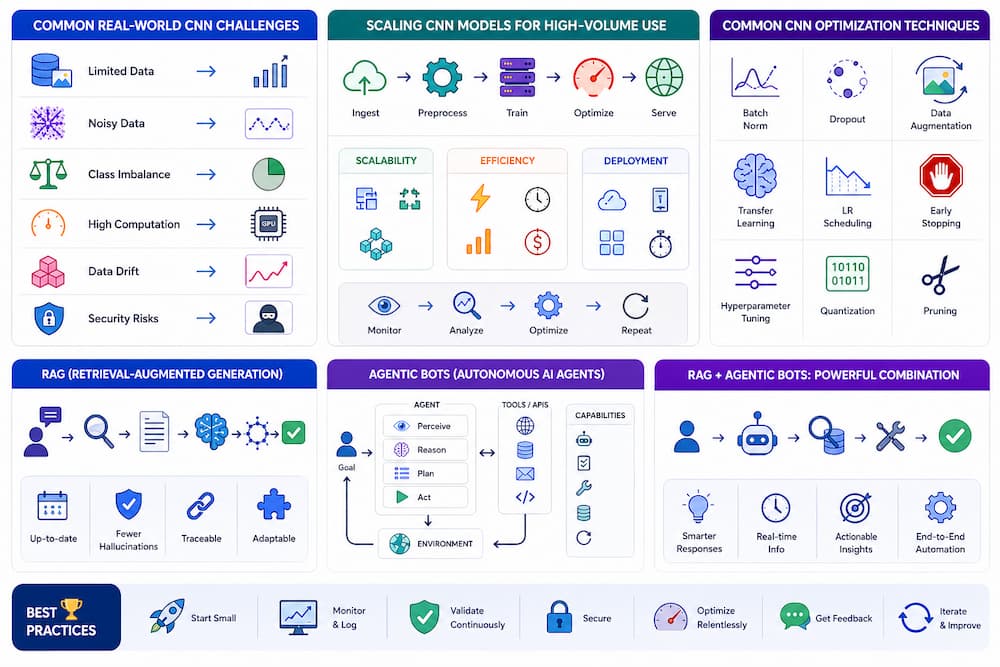
Some CNN systems can be combined with RAG, which stands for Retrieval-Augmented Generation.RAG means the AI does not rely only on what it learned during training. It also retrieves relevant information from external sources, such as documents, databases, or medical guidelines.
In a medical example:
- A CNN detects a suspicious region in an image.
- A retrieval system finds similar cases or medical guidelines.
- A language model explains the result using both the CNN output and retrieved information.
- The final response becomes more useful and context-aware.
This is especially useful for agentic bots, which are AI systems that can perform multi-step tasks, make decisions, and connect to tools or workflows.
Conclusion
CNN model assembly is the process of turning raw image data into a working AI system that can recognise patterns, classify images, and support real-world decisions. Although the technical terms can seem complicated, the basic idea is straightforward: a CNN learns visual patterns layer by layer, starting from simple details like edges and gradually building toward complex understanding.
To build a strong CNN system, teams need to prepare good data, design the right architecture, use transfer learning where possible, prevent overfitting, test performance carefully, and deploy the model in a way that fits real business or medical workflows.
The case studies show that CNNs can deliver strong results, such as faster logo detection, reduced manual review time, improved website conversion rates, and better image-based decision support. However, success depends not only on the model itself but also on data quality, expert validation, workflow integration, and regular improvement.
In simple terms, a CNN is like a trained visual assistant. It studies many examples, learns what important patterns look like, and then uses that knowledge to make predictions on new images. When assembled properly, CNN models can become powerful tools for healthcare, marketing, e-commerce, automation, and many other industries.
Frequently Asked Questions
What is CNN model assembly?
CNN model assembly is the process of building a Convolutional Neural Network by combining layers, preparing image data, training the model, testing it, and deploying it for real use. It includes choosing the right architecture, setting training parameters, using techniques like transfer learning, and evaluating performance.
Why are CNNs used for image analysis?
CNNs are good at image analysis because they can detect patterns in images step by step. They start with simple features like edges and textures, then combine them into more complex objects and meanings. This makes them useful for image classification, object detection, medical imaging, logo recognition, and many other visual tasks.
What is transfer learning?
Transfer learning means using a model that has already been trained on a large dataset and adapting it to a new task. Instead of starting from zero, the model reuses what it already knows about visual patterns. This saves time, reduces the amount of data needed, and often improves performance.
What is overfitting?
Overfitting happens when a model memorises the training data instead of learning general patterns. An overfitted model may perform well during training but badly on new images. Techniques like dropout, data augmentation, regularisation, and early stopping help prevent overfitting.
What is data augmentation?
Data augmentation means creating modified versions of existing images. These changes may include rotation, flipping, zooming, or brightness adjustment. This helps the model learn from more varied examples and improves its ability to handle new images.
What is GradCAM?
GradCAM is a technique that shows which parts of an image influenced a CNN’s prediction. It creates a heatmap over the image. This is useful in areas like healthcare because experts can check whether the model focused on the correct region.
What tools are commonly used for CNN model assembly?
Common tools include:
- TensorFlow
- Keras
- PyTorch
- Google Cloud Vertex AI
- TensorFlow Serving
- TensorRT
- Scikit-learn
These tools help with model building, training, testing, optimisation, and deployment.